Agencies and WordPress
Add astrology to a client site in an afternoon
Drop a panchang, horoscope, kundli or matching widget into any site with one script, or install the WordPress plugin and use a block or a shortcode. No ephemeris, no backend and no client code to maintain.
Free trial with 5,000 credits, no card required

The problem
What an agency has to solve
Astrology requests arrive as a small line in a bigger brief, and the site still has to be fast, safe and branded.
- 01A short deadlineThe client wants a panchang box on the home page this week. A widget needs one script and a div.
- 02A key that must not leakThe widgets use a publishable key that only works on the domains you allow, and the WordPress plugin keeps the secret key on the server.
- 03A theme you do not controlThe widget lives in a Shadow DOM, so the client's CSS cannot break it and it cannot break the page.
- 04Many clients, many keysPlans with several projects let you keep each client on its own key and usage.
- 05Visitors in other languagesSet the widget language with one attribute.
- 06A shop that sells reportsThe plugin can turn a WooCommerce product into a personalised PDF or narrated MP3, made when the order is paid.
What you can build
What clients ask for, and what answers it
- 1 to 3 creditsDaily PanchangPanchang & almanacA panchang box for a temple, calendar or media site: the widget or the `[astro96_panchang]` shortcode.See the endpoint
- 1 creditMoon-Sign Horoscope: DailyPredictions & readingsA daily horoscope block for any sign.See the endpoint
- 3 creditsFull Birth Chart BundleVedic chartsA kundli form: visitors enter birth details and see their chart.See the endpoint
- 1 creditQuick Nakshatra MatchCompatibility matchingA matching check for two people, as a widget or a form.See the endpoint
- 1 creditAshtakoot DetailsCompatibility matchingThe full guna milan detail behind a matching form.See the endpoint
- 3 creditsFestival CalendarFestivals & muhurtaA festival calendar page for a community site.See the endpoint
- 10 creditsKundli Matching ReportReportsA paid matching report sold as a WooCommerce product.See the endpoint
WordPress
The plugin: blocks, shortcodes and a shop
Install the 96Astro plugin, paste your key and add a block or a shortcode. Visitors' browsers talk only to the site, and the site calls the API, so the key is never in a page. Identical requests are served from a cache and the kundli and matching forms are rate limited per visitor, so credits are protected.
- Blocks and shortcodesPanchang, horoscope, kundli, matching, Western birth chart and numerology.
- WooCommerce reportsSell a personalised PDF or MP3 report. The report is made when the order is paid and a repeated payment hook never makes or charges a second report.
- Your brand on the PDFName, colour, footer and website print on the report.

How it works
From a client brief to a live page
A typical agency job: a widget first, the WordPress plugin where the site runs on it, and the API when the client wants its own design.
Embed a widget on a static or custom site
Create a publishable key in the dashboard, allow the client's domain and add the widget to the client's page.
Or use the WordPress plugin
Install and activate the plugin, paste the key under Settings, 96Astro API, then place a shortcode in any page.
Call the API when the client wants its own design
From the site's backend, send the two stars and show the result in the client's own components.
Keep secret keys (sk_) on the server. Only a publishable key (pk_) may appear in a page, and only for the domains you allow.
Read the integration guideWidgets
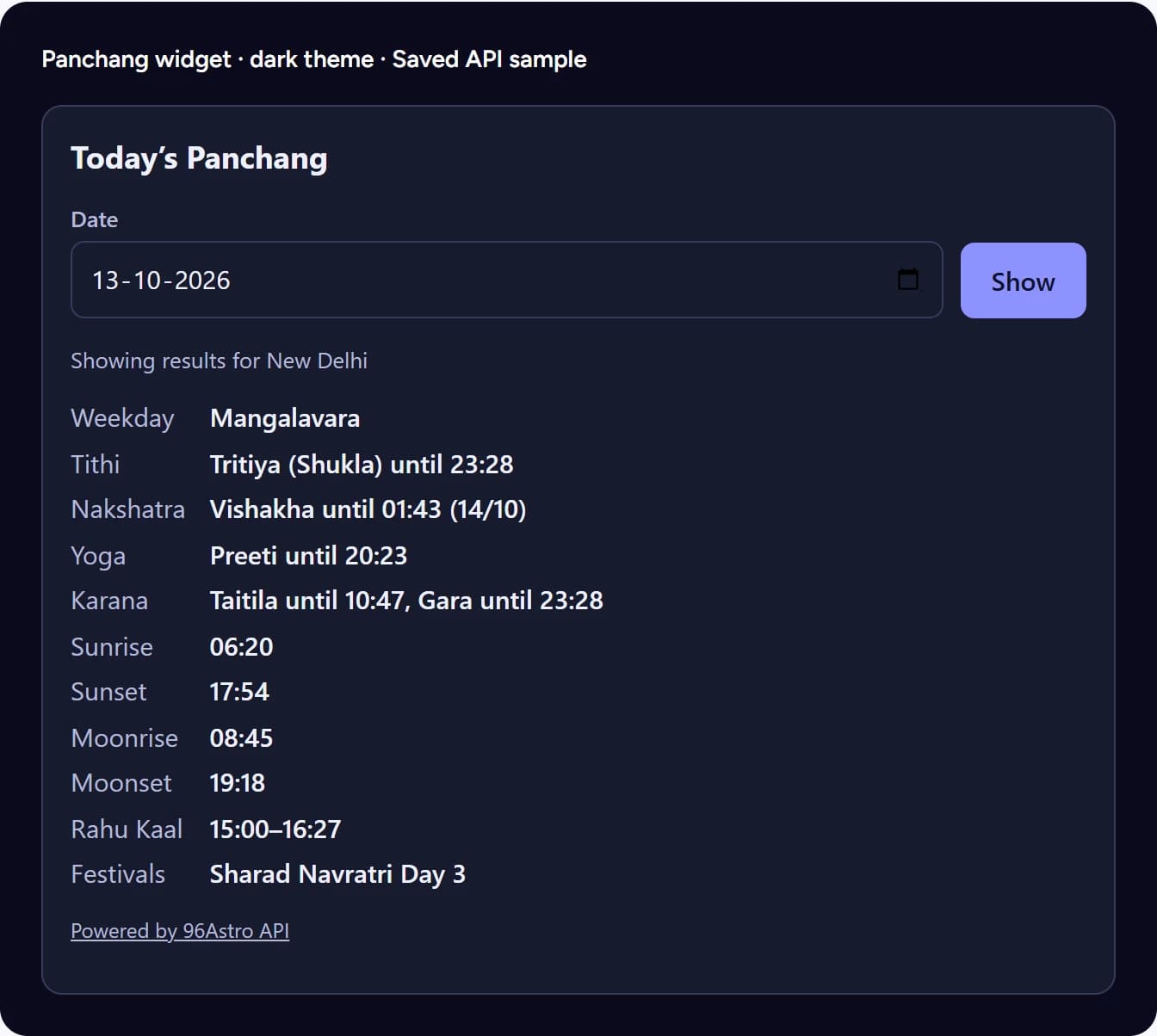
Five widgets, one script
Panchang, daily horoscope, kundli, matching and an AI chat bubble. The script is about 14 KB gzipped with no dependencies, follows the visitor's light or dark setting and speaks the language you set with data-lang.
- Live previewsEach preview on the widgets page is the real widget showing a saved sample chart.
- Safe on any pageA Shadow DOM keeps your CSS and the widget apart.
What it costs
Typical monthly workloads, priced from the live price book
A typical month
A client panchang widget, worst case
20,000 credits a month
Calls and credits for A client panchang widget, worst case Call Calls Credits Panchang widget view, one call each1 credit a call 20,000 20,000 The smallest plan that covers it:
Constellations Almanac Desk, Base
₹699 or $10 a month, with 25,000 credits.
Worst case: 20,000 views a month and every view makes its own call.
A typical month
A WordPress site with the plugin cache
390 credits a month
Calls and credits for A WordPress site with the plugin cache Call Calls Credits Panchang for the default city1 credit a call 30 30 Daily horoscope (12 signs x 30 days)1 credit a call 360 360 The smallest plan that covers it:
Constellations Daily Feed, Base
₹699 or $10 a month, with 40,000 credits.
The plugin serves identical requests from its cache, so a repeat view costs nothing.
Assumes the worst case for the widget (a call per view) and the plugin's cache for WordPress. Sandbox keys cost nothing, so you can build and review a client site before it goes live.
See all plans and pricesAlso in the box
Projects, languages, SDKs and PDF
What helps when you run many client sites.
- Projects and budgetsCosmos Apex and Observatory have unlimited projects with a budget per project. See pricing.
- LanguagesWidgets and results in 25 languages besides English. See languages.
- SDKsPHP, JavaScript, Python and more. See SDKs.
- White-label PDFYour client's brand on the report. See the PDF API.
Trust
Accurate, and clear about how data is handled
- 2,056 of 2,062 values agreeChecked against independent references on 27 test charts and 6 matching pairs, each within its stated tolerance. See the method and every check.
- What happens to the birth data you sendWe process request data only to compute your result and do not use it for anything else. Usage records keep the capability called, status, timing, credits and a one-way fingerprint of the request, not the request body. See the privacy policy.
- Support response timesFirst response by plan: Orbit, Constellations and Custom Orbit within 2 business days; Cosmos Rise and Zenith within 1 business day; Cosmos Apex within 8 business hours in a priority queue. Business hours are Monday to Friday, 10:00 to 18:00 IST. See the service levels.
- Uptime and statusOrbit, Constellations and Custom Orbit target 99.5% monthly uptime and Cosmos 99.9%, with service credits if a target is missed. The status page shows live health and incident history.
FAQ
Questions
01Do the widgets expose my API key?+
A widget uses a publishable key (pk_), which only works on the domains you allow. Your secret key (sk_) is never put in a page. See the widgets guide.
02Does the WordPress plugin keep my key safe?+
Yes. Visitors' browsers talk only to your site and your site calls the API with your key, so the key is never in a page.
03Can I sell reports from WooCommerce?+
Yes. The plugin turns a product into a personalised PDF or narrated MP3: choose the report, language and, for audio, the voice and style. The report is made when the order is paid and the buyer is emailed a download link.
04Will the widget break my client's theme?+
No. It is drawn inside a Shadow DOM, so your CSS cannot change it and it cannot change your page.
05Which widgets are there?+
Panchang, daily horoscope, kundli, matching and an AI chat bubble. See widgets.
06How do I keep each client's usage separate?+
Use one project and key per client where your plan includes projects. Cosmos Apex and Observatory have unlimited projects and a budget per project; other plans include fewer. See pricing.
07What does a widget view cost?+
A widget calls the API, so each uncached view can use credits. Cache on your side when you use the API directly, and use the plugin's cache on WordPress.
08Can I try it before paying?+
Yes. Create an account for the free trial (5,000 credits, no card needed). Sandbox keys are free and answer every endpoint, so you can build the whole integration before you spend a credit. After the trial the free Spark plan keeps a small monthly allowance. See pricing.
09Which languages are supported?+
AI readings can be written in 26 languages (English and 25 more), and most calculations and reports also answer in those 25 languages: send language with an ISO 639-1 code. The text is machine-written and has not been reviewed by native speakers. Field names and values never change with language. See languages.
Add astrology to your next client site
Create a free key and put a widget on a page today.